SleepMix / Features
Get to your mix in fewer taps
At bedtime, every extra tap is a little more screen light. SleepMix has several ways to reach a mix without opening menus; one is fully confirmed, and the others come with notes.
Quick Actions on the app icon
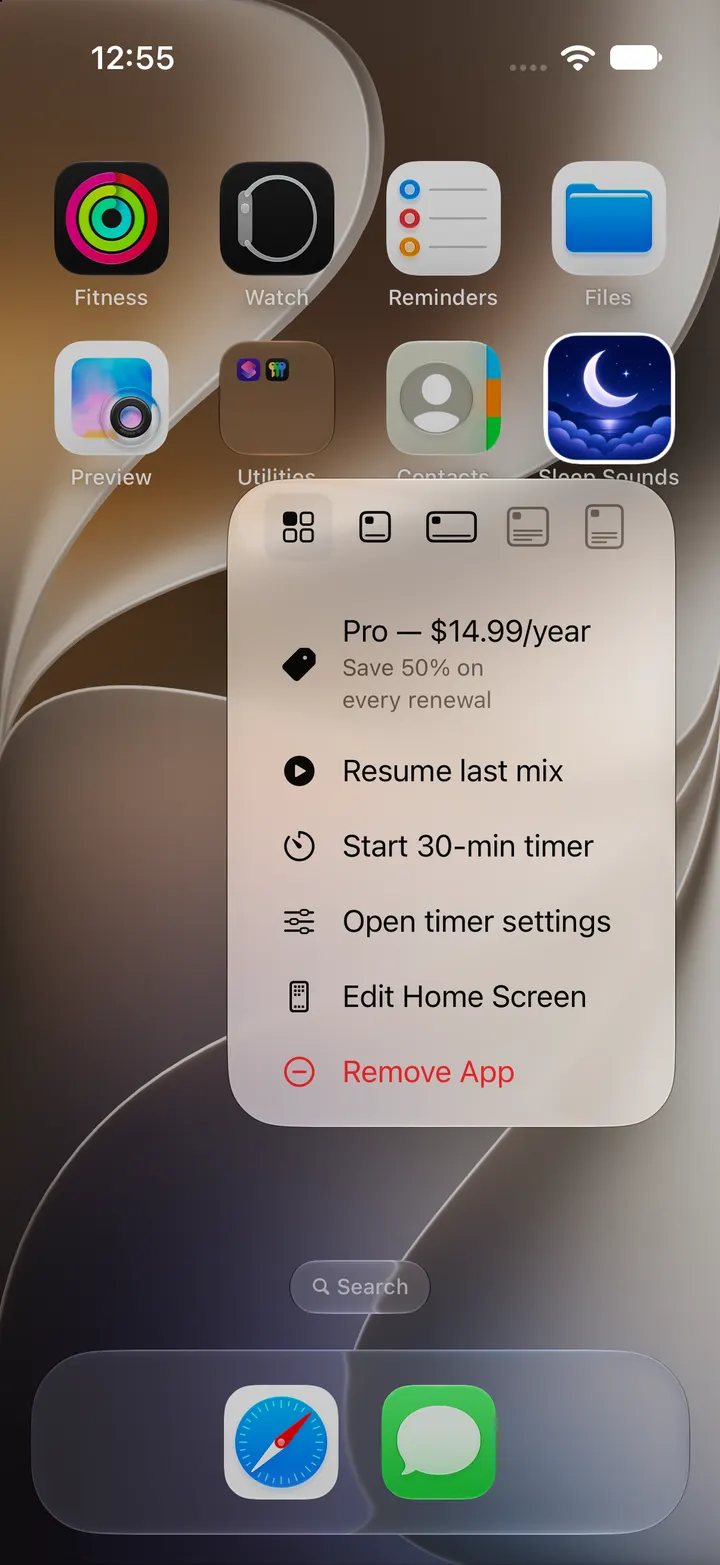
Press and hold the SleepMix icon on the home screen to open its Quick Actions. Resume last mix opens the app and plays the mix you used most recently. It is the shortest route from a dark bedroom to sound.
Start 30-min timer sets the timer to 30 minutes and opens the Mix screen, where you press play. Open timer settings opens the Mix screen too. Free users may also see a dated offer in this menu; prices and discounts change, so check the App Store before buying anything.
An action for the Shortcuts app
SleepMix adds a Start Sleep Preset action to Apple’s Shortcuts app. Give it the name of a saved preset and it opens SleepMix with that mix, so you can place it in a shortcut or a personal automation you build yourself.
There are no ready-made Siri phrases, so you create the shortcut by hand. The action also has a timer field, but in the current version that value is not applied, so set the timer in the app after the preset opens.
Widget and Spotlight: not yet confirmed
The app includes a Tonight’s Mix widget in small, medium and Lock Screen sizes, designed to show your last mix and up to three presets. Saved presets are also meant to appear in Spotlight search.
In our simulator test the widget stayed on “No mix yet” after a preset was saved, and Spotlight returned no SleepMix result. That is why neither is pictured here. They will be shown only after they have been confirmed on a real iPhone.
A simple bedtime setup
Save the mix you use most as a preset first, because both Resume last mix and the Shortcuts action rely on a mix you have already made. Then keep SleepMix in the dock or on your first home screen page, so the long press is easy to find in a dim room.
A Sleep Focus filters notifications; it does not stop sound that is already playing. If you also use the Pro bedtime reminder, allow SleepMix in that Focus so the reminder can appear.
Lock screen and Control Center
SleepMix has no button of its own in Control Center. While a mix plays, the standard Now Playing controls on the lock screen and in Control Center handle play and pause.
Checked against the app’s source code and real simulator captures on 28 October 2026. Screenshots come from a clean iPhone simulator; demo or empty states are named in each caption. Features can change in later app updates.